 MIDILLI Tech
Get MIDILLI Configurator
MIDILLI Configurator is an all-in-one software that lets you customize every parameter of your MIDILLI devices, update their firmware, and more. It is available for Windows, macOS, Linux, and experimentally in the major Web Browsers including the mobile ones
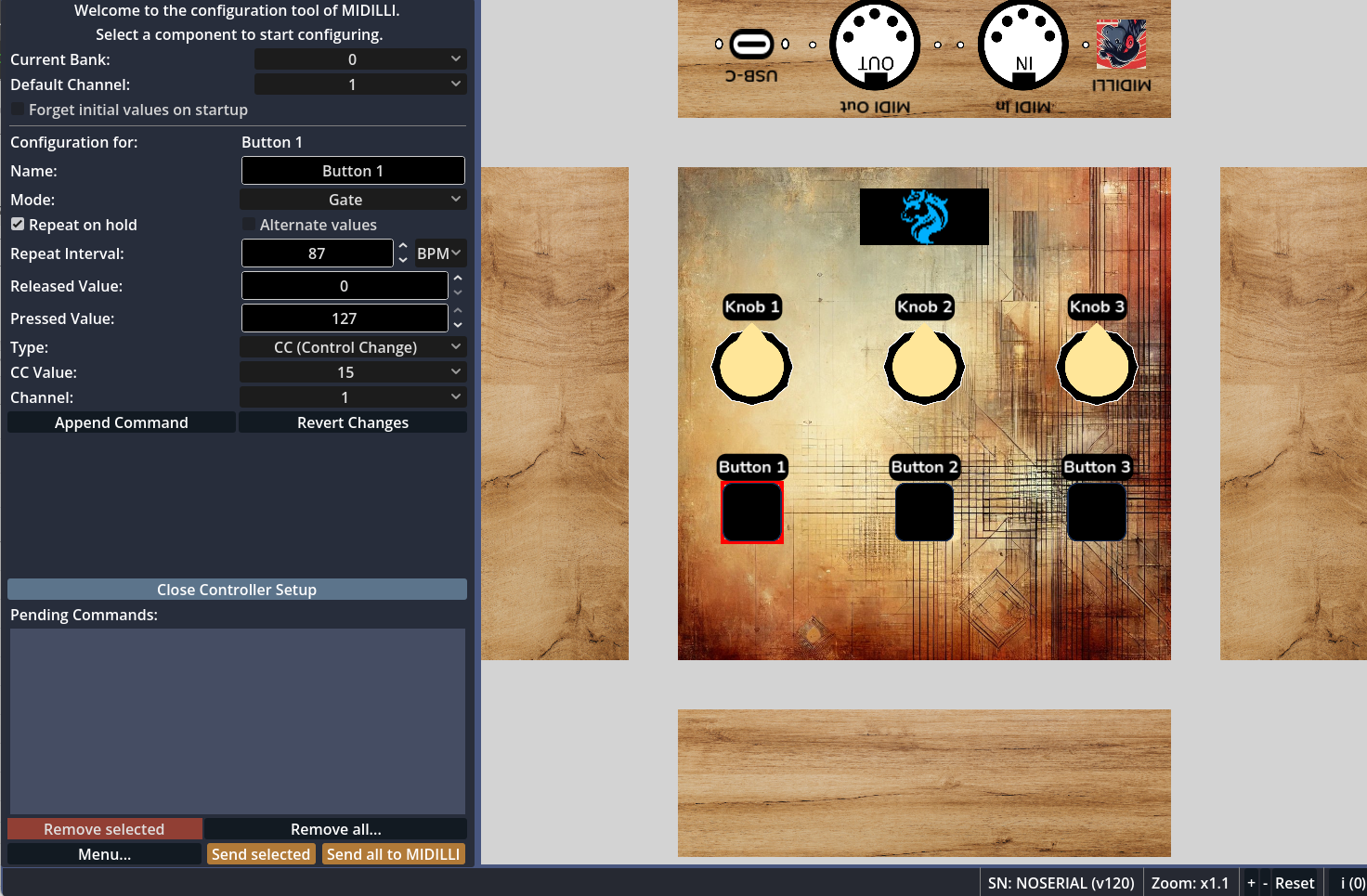 Configurator: A small setup is loaded and button is selected.
For first-time use, an internet connection is required to sync and match your hardware with your design. Once synchronized, you can go offline, and work offline.
Choose your operating system to get the executables or launch the web version.
See the license here.
Launch Web Version (Experimental)
Current version: 1.8.1 - Released: 04.11.2025
Were you just looking for help? Then read the manual here:
Features
Configurator is the only software you need to get the most out of your MIDILLI devices. Once you register your device on your MIDILLI account, it will align with your own design. Almost no learning curves because you designed it!
Here is a list of its features:
Unique interface aligned with your own design(s)
Can work as a standalone application on Windows, macOS, and Linux
Can also work on common desktop and mobile browsers without downloading (experimental)
Set behaviour of each control element
Change visible name of the components for each bank*
Real-time view of current functions of the control elements at the current bank
Change default channel of all components
Check and update firmware of your controller
Enable or disable inputs or outputs
Built-in MIDI Listener to check if the current setup matches your expectations
Configure buttons for simple MIDI automation
Change how the MIDI messages are transmitted using MIDI Router
Filter which messages should be transmitted to which MIDI outputs
Import or export device settings
Configure mLink
*Bank: Depending on the number of control elements on your controller, you can change between different sets of MIDI assignments, allowing each button, knob, or fader to control different functions. Read more about banks here.
Download
Windows
Note: Only compatible with 64-bit systems. 32-bit is not supported.
How to run?
Download the file.
Unzip to any folder.
Launch:
MIDILLIConfigurator.exe
Having problems or any questions?
Check Help & Support section.
macOS
Note: Requires Sierra (10.12) or newer version.
How to run?
Download the file.
Unzip to any folder.
Move
MIDILLI.appto the /Applications folder (optional).Double-click
MIDILLI.appto launch it.
Having problems?
If you see a security warning (from Gatekeeper), go to System Settings > Privacy & Security, then allow
MIDILLI.appto open.Still not possible to start? Then open a terminal and type
xattr -dr com.apple.quarantine MIDILLI.appand press enter.
Any further issues or questions?
Check Help & Support section.
Linux
Note: Only compatible with 64-bit systems. 32-bit is not supported.
How to run?
Download the file.
Unzip to any folder.
Start using:
MIDILLI Configurator.desktoporMIDILLIConfigurator.x86_64
Having problems?
Then execute the following on the terminal first:
chmod +x "MIDILLI Configurator.desktop" MIDILLIConfigurator.x86_64Any further issues or questions?
Check Help & Support section.
Version History
1.8.1 (04.11.2025):
Updated: URL to access MIDILLI servers.
Fixed: Downloading custom created document fails.
1.8.0 (02.11.2025):
Improved: Startup time (up to 50% faster).
Added: Bypass MIDI Message option for Buttons added.
Added: Bypass MIDI Forwarding option for Buttons added.
Added: Option to open MIDILLI settings folder.
Added: Option to reset the Configurator to its factory settings.
Updated: Godot to version: 4.6.
Updated: Firmware updater to version: 5.1.0.
1.7.1 (22.07.2025):
Added: New color support.
Fixed: Bug on individual routing configuration of MIDI interfaces.
1.7.0 (14.07.2025):
Added: Experimental web version. Accessible via: Configurator Web.
Added: Support for new device backgrounds.
Changed: Shortcut to open MIDI Routing Matrix from Ctrl+T to Ctrl+A to work on browsers.
Fixed: A major bug on MIDI routing.
1.6.0 (25.06.2025):
Added: mLink (MIDILLI Link) support.
Added: Support for TRS MIDI In and MIDI Thrus.
Fixed: Some minor bugs.
1.5.1 (16.06.2025):
Added: Support for foot controller components.
Added: Splash screen when no setup is loaded.
Improved: Zoom functionality to zoom in/out on focused content.
1.5.0 (10.06.2025):
Added: Sending static and dynamic SysEx messages.
Added: Filtering messages by channel.
Added: Downloading of quick manual for your design.
Improved: Startup time.
1.4.0 (23.05.2025):
Added: Trigger mode for buttons to send only pressed value.
Fixed: Minor issues.
1.3.2 (08.04.2025):
Maintenance release.
1.3.1 (31.03.2025):
Added: Integration of MIDI Filtering for specific MIDI messages on different MIDI interfaces.
1.3.0 (26.03.2025):
Added: Sending Clock signal on Buttons.
Added: MSB/LSB Converter Utility
Added: Advanced settings window for driver latency correction, and RPN, NRPN parameter release.
Improved: Disabling non-relevant fields for some types.
Fixed: Minor bugs.
1.2.0 (24.03.2025):
Added: Sending PC (Program Change), NRPN (Non-Registered Parameter Number) and RPN (Registered Parameter Number) on Buttons and Knobs.
Added: Repeat intervals in milliseconds (ms) or beats-per-minute (BPM) mode is possible.
1.1.1 (08.03.2025):
Added: Import and Export Controller settings.
Fixed: Minor bugs.
1.1.0 (03.03.2025):
Added: Integration of Wireless MIDI functionality.
Added: MIDI Message Router utility.
1.0.3 (27.02.2025):
Added: Selective sending commands.
Added: Context menu to change selection in pending commands.
Added: Repeating alternate values integrated.
Improvement: Better scaling of GUI.
1.0.2 (24.02.2025):
Added: Automation features integrated.
Added: Amnesia mode to ignore initial values of knobs and faders.
Added: Additional startup delay for more time on logo and text integrated.
Fixed: Minor bugs.
1.0.1 (20.02.2025):
Fixed: Correct displaying of the visible names.
Fixed: Minor bugs.
1.0.0 (07.02.2025):
Initial version.